Sub
Canceling Planet Fitness can be confusing when you can't find the cancellation button or aren't sure whether another payment is due. This guide walks you through the website steps, explains the billing deadlines and fees, and shows what to do if online cancellation doesn't work.
If you need to cancel by mail, you can use the letter builder below. We'll also explain how to confirm your membership has ended and check any charges after cancellation.
| Cancellation route | Where to start | What to keep |
|---|---|---|
| Online | Planet Fitness My Account | The final response and any confirmation or effective date shown |
| By mail | Your home club's cancellation mailing address | A copy of your signed letter, mailing/delivery records and the club's response |
| In person | Your home club | Written confirmation, the effective date and any final balance |
Your home club is the club associated with your membership.
Official source: Planet Fitness membership FAQ. Under Membership & Billing, select Show More, then How do I manage my membership?
Check your billing dates and cancellation fee
Monthly payments and the annual fee have different deadlines
Planet Fitness gives separate cancellation deadlines for monthly payments and its annual fee:
| Charge you want to stop | When the club must receive your cancellation request |
|---|---|
| Monthly payment | At least 8 days before your next billing date |
| Annual fee | At least 8 days before your annual fee date |
The club must receive your request by the deadline. Planet Fitness says billing changes can take up to 7 days. If you mail a letter, send it early enough to arrive on time. Planet Fitness membership and billing FAQ
For example, if your next monthly payment is on October 17, the club must receive your request by October 9. If your annual fee is due on November 1, it must receive your request by October 24. Check your agreement and home club’s instructions too, because procedures may vary by location.
To check your billing schedule:
- On the website: Sign in to Planet Fitness online billing.
- In the PF App: Open the account menu and select My Billing Info & Balance.
- If you need help: Contact your home club about your billing schedule.
Source: PF FAQ, “Where can I learn more about the PF billing schedule?”.
Check whether your agreement has a minimum term
A commitment means a minimum number of months you're agreeing to pay for. Planet Fitness says canceling before your agreed membership term ends requires a $58 early cancellation fee, which it calls a buyout fee.
For No Commitment memberships, Planet Fitness says you can cancel without a cancellation fee.
Some Planet Fitness memberships have a 12-month commitment. Check your agreement to see whether yours does. The Classic or PF Black Card name alone won’t tell you.
Even if you don’t have to pay an early cancellation fee, you may still owe monthly payments, the annual fee or an unpaid balance. Ask your home club how much you still need to pay and what each charge is for.
How to cancel Planet Fitness online
You can cancel through the Planet Fitness website. The steps below show how to do it on your phone, but you can also follow them on a desktop or laptop. The layout may look different, and your account may show different charges, dates or options.
-
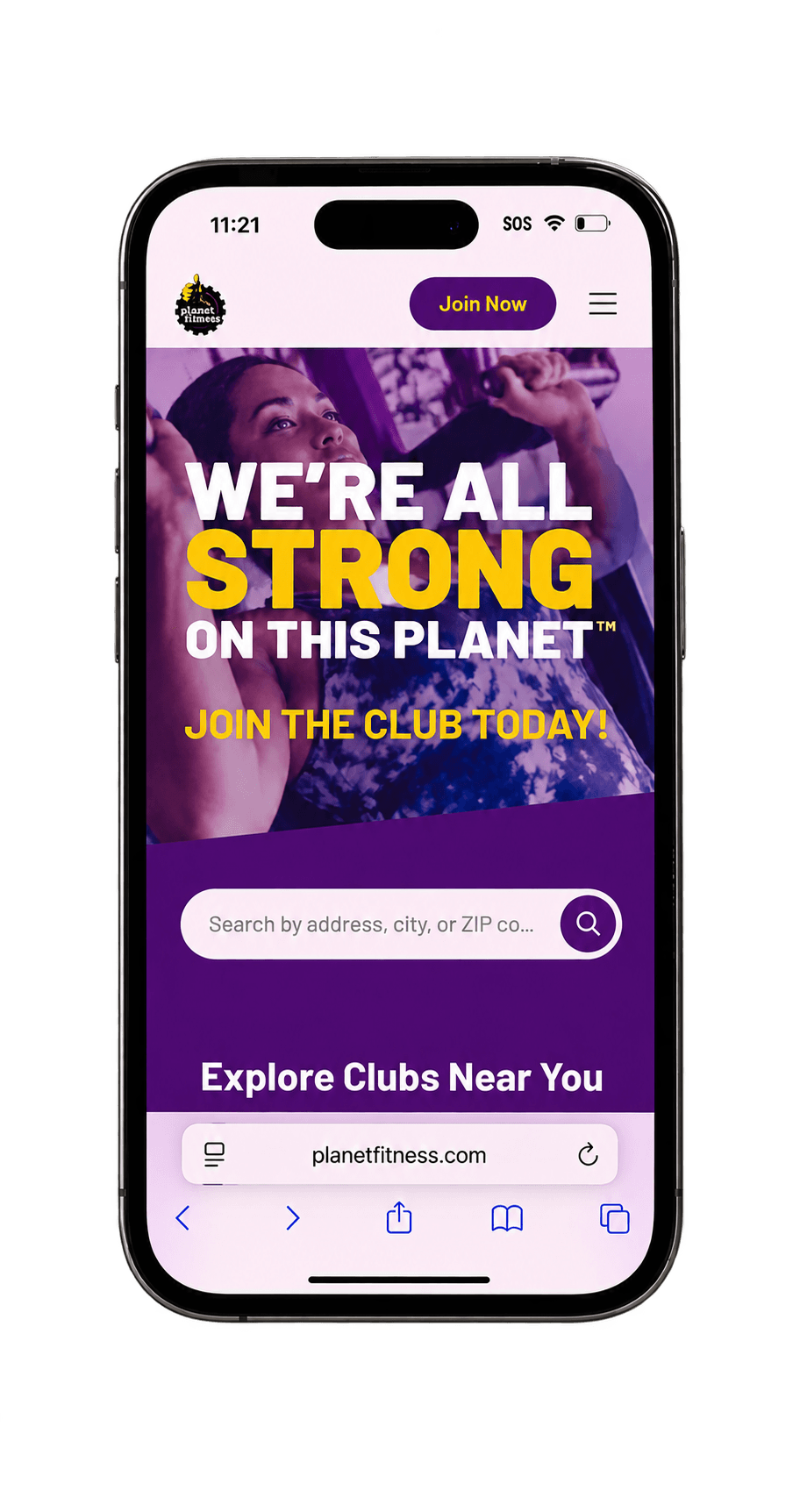
Go to planetfitness.com in your browser. Tap the three-line menu in the top-right corner.
-
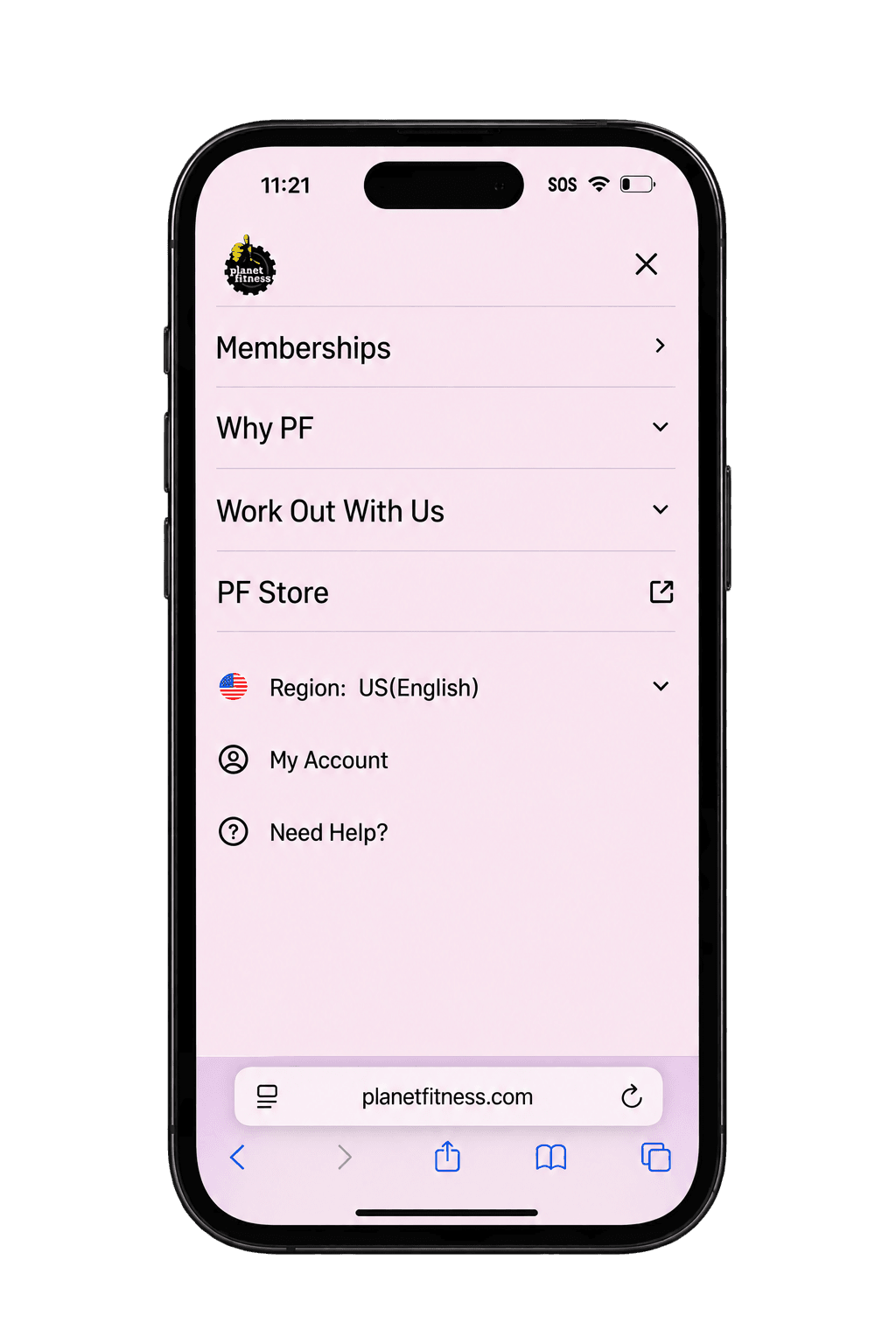
In the menu, tap My Account.
-
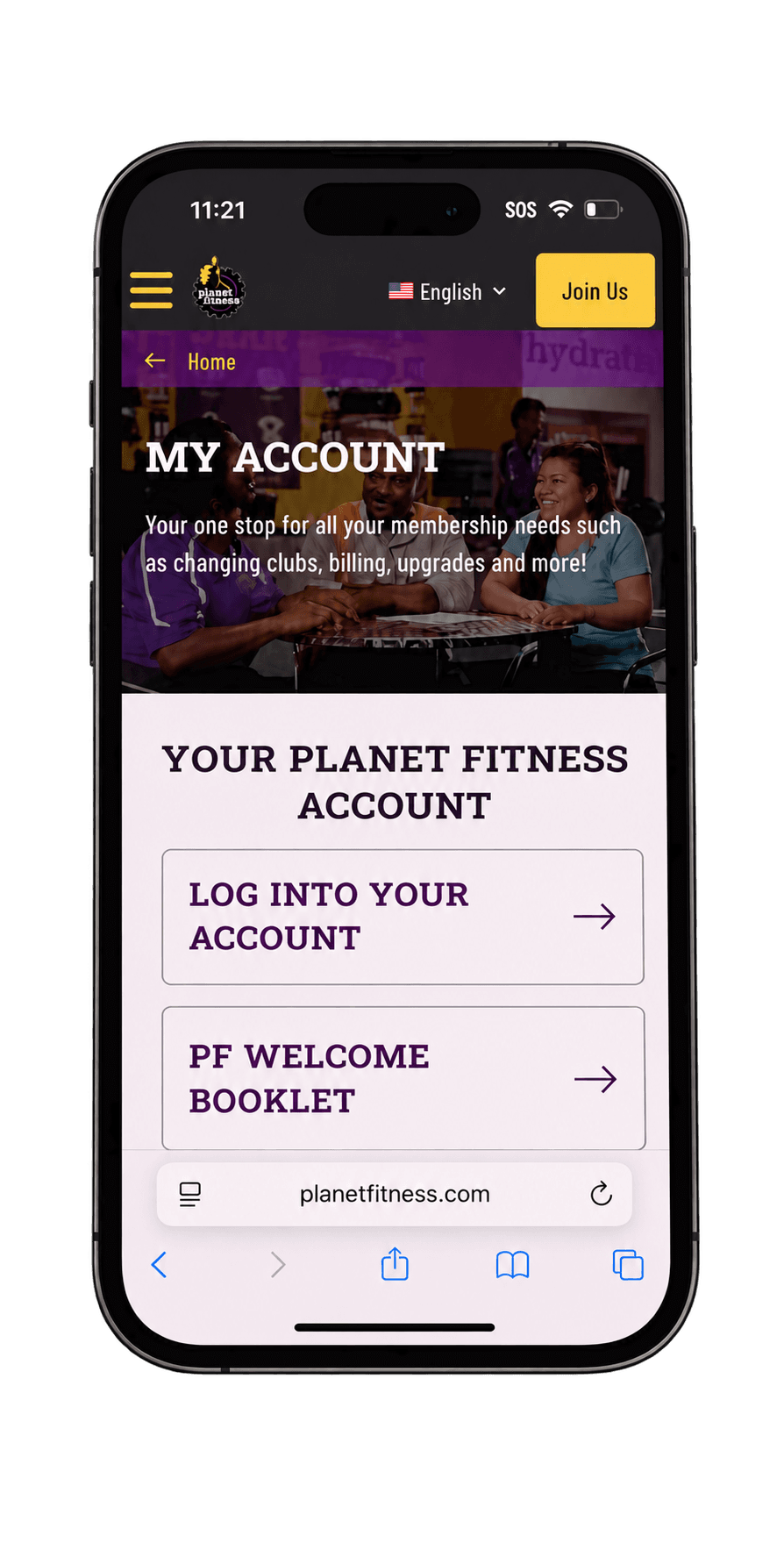
Tap Log Into Your Account.
-
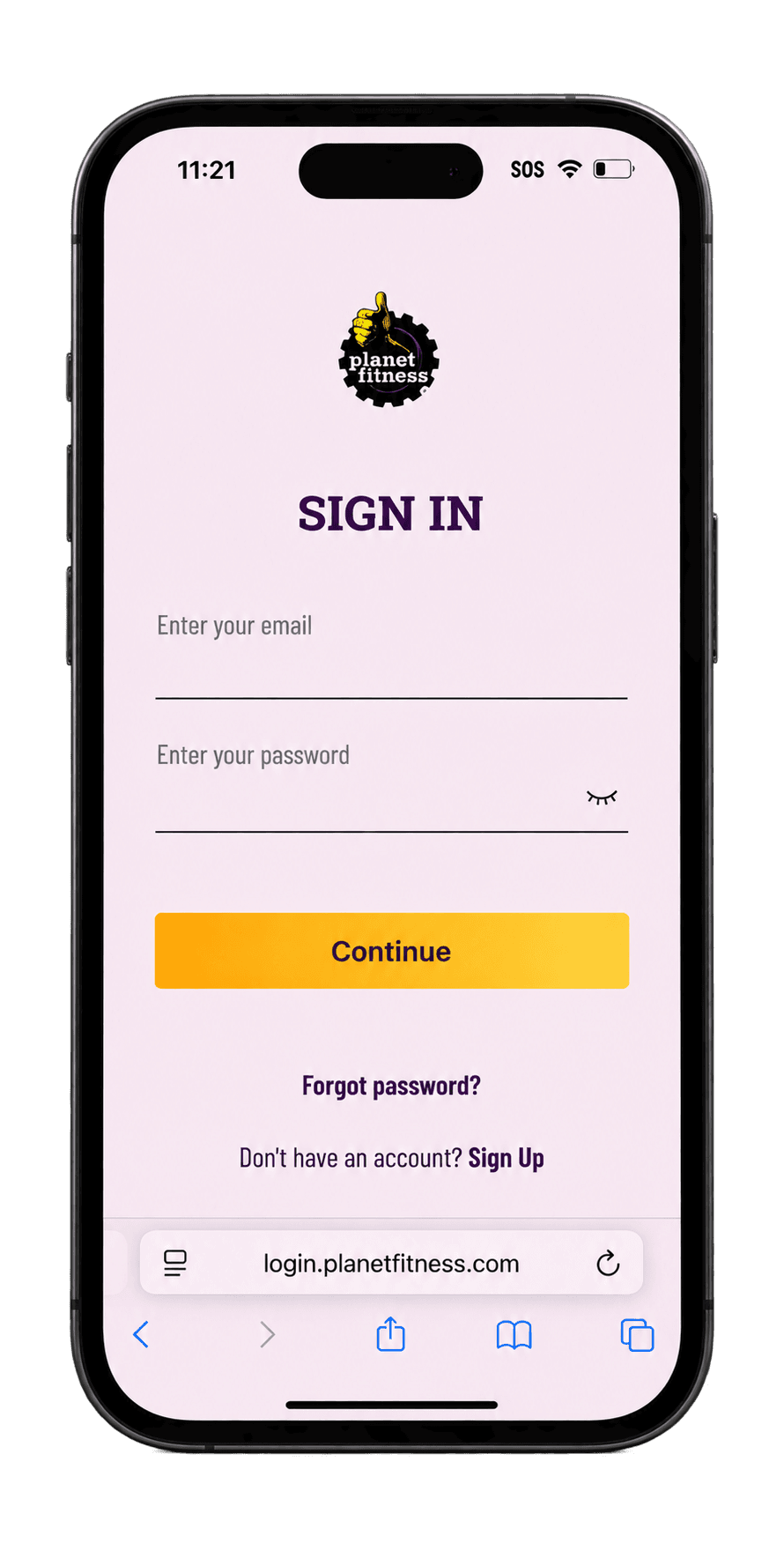
Enter the email and password connected to your membership, then tap Continue.
-
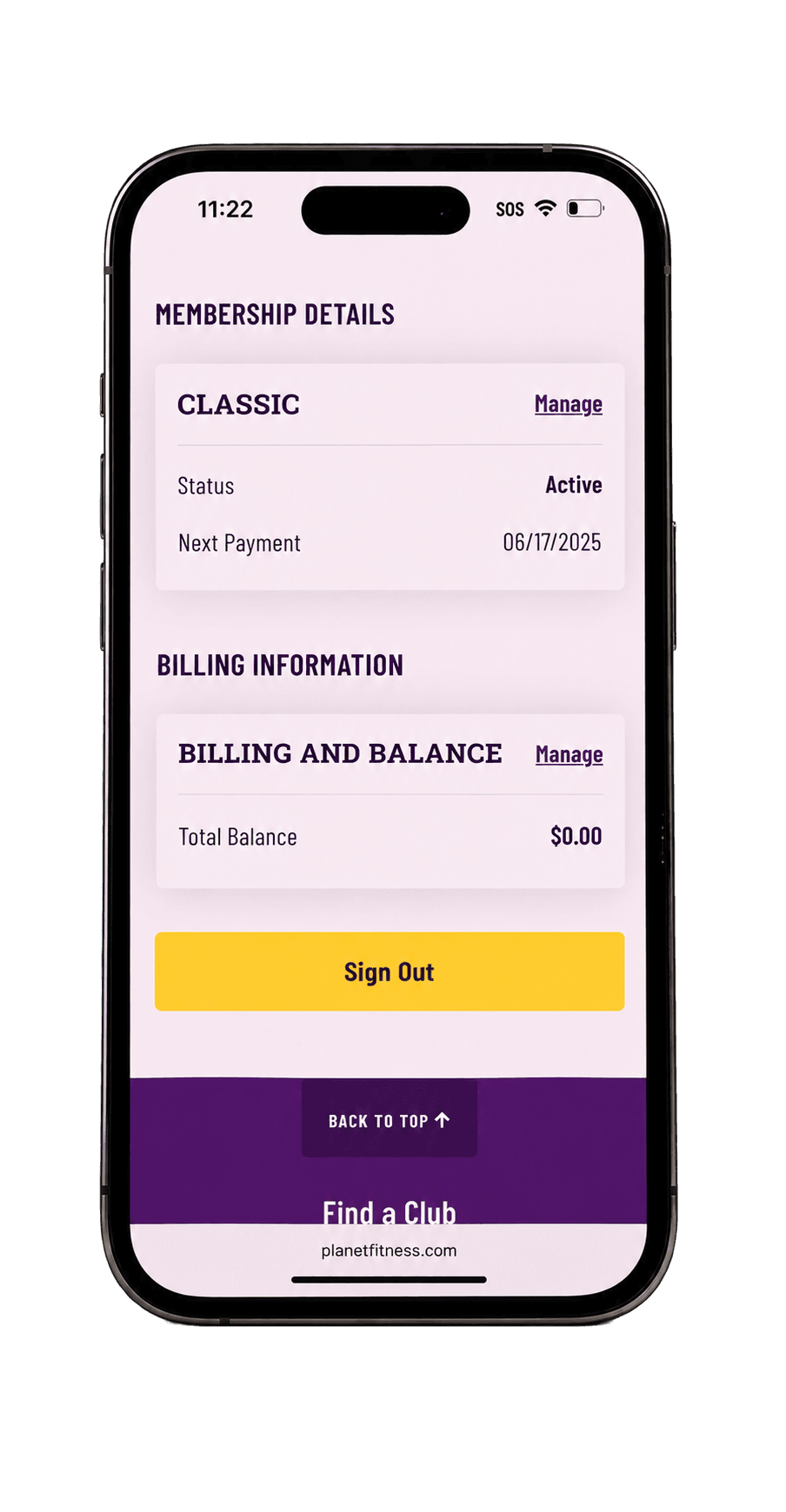
Under Membership Details, tap Manage next to your membership.
-
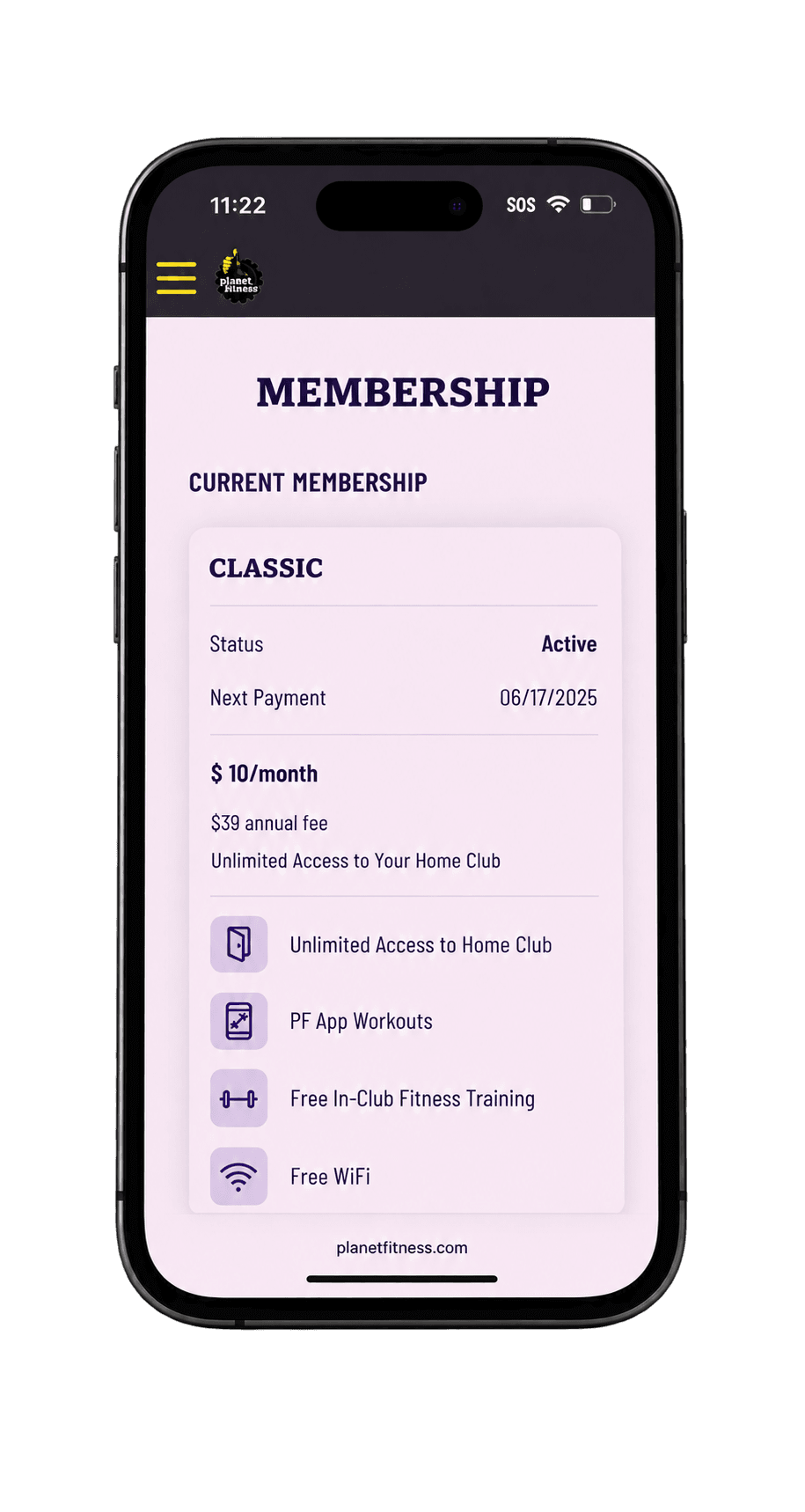
Make sure this is the membership you want to cancel, then scroll down.
-
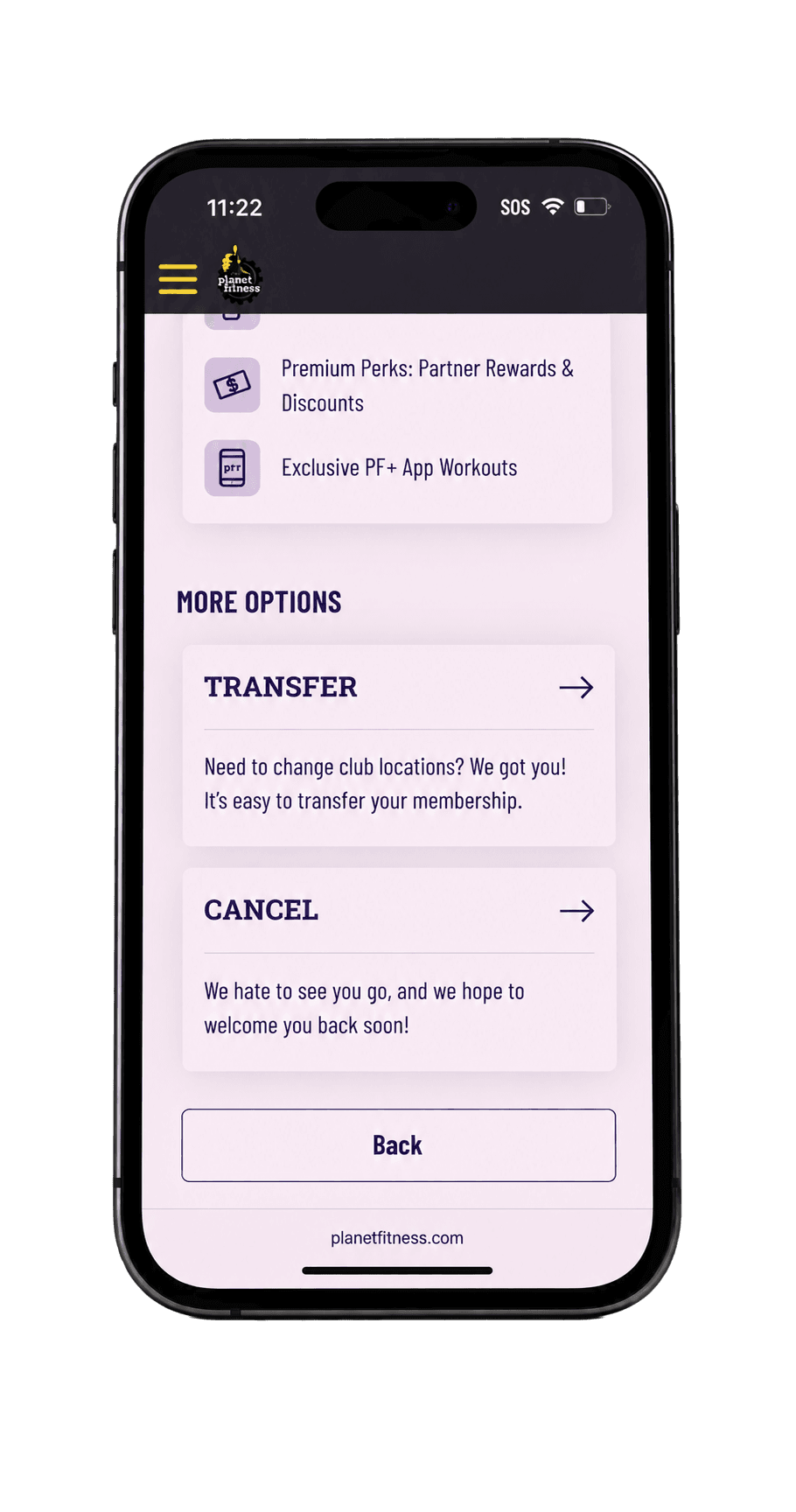
Under More Options, tap Cancel.
-
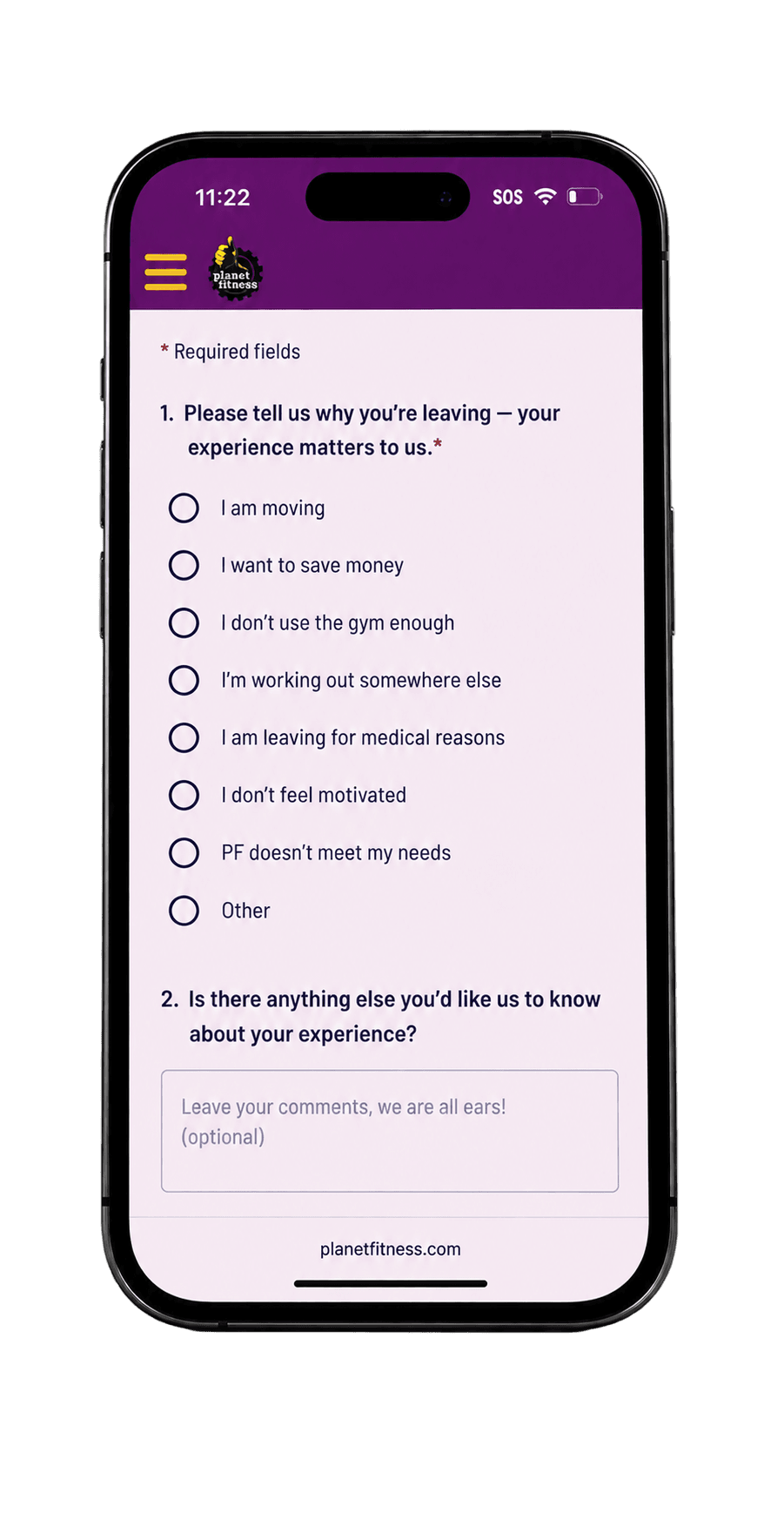
Select the reason that best matches your situation. Adding a comment is optional. Complete any other required questions shown.
-
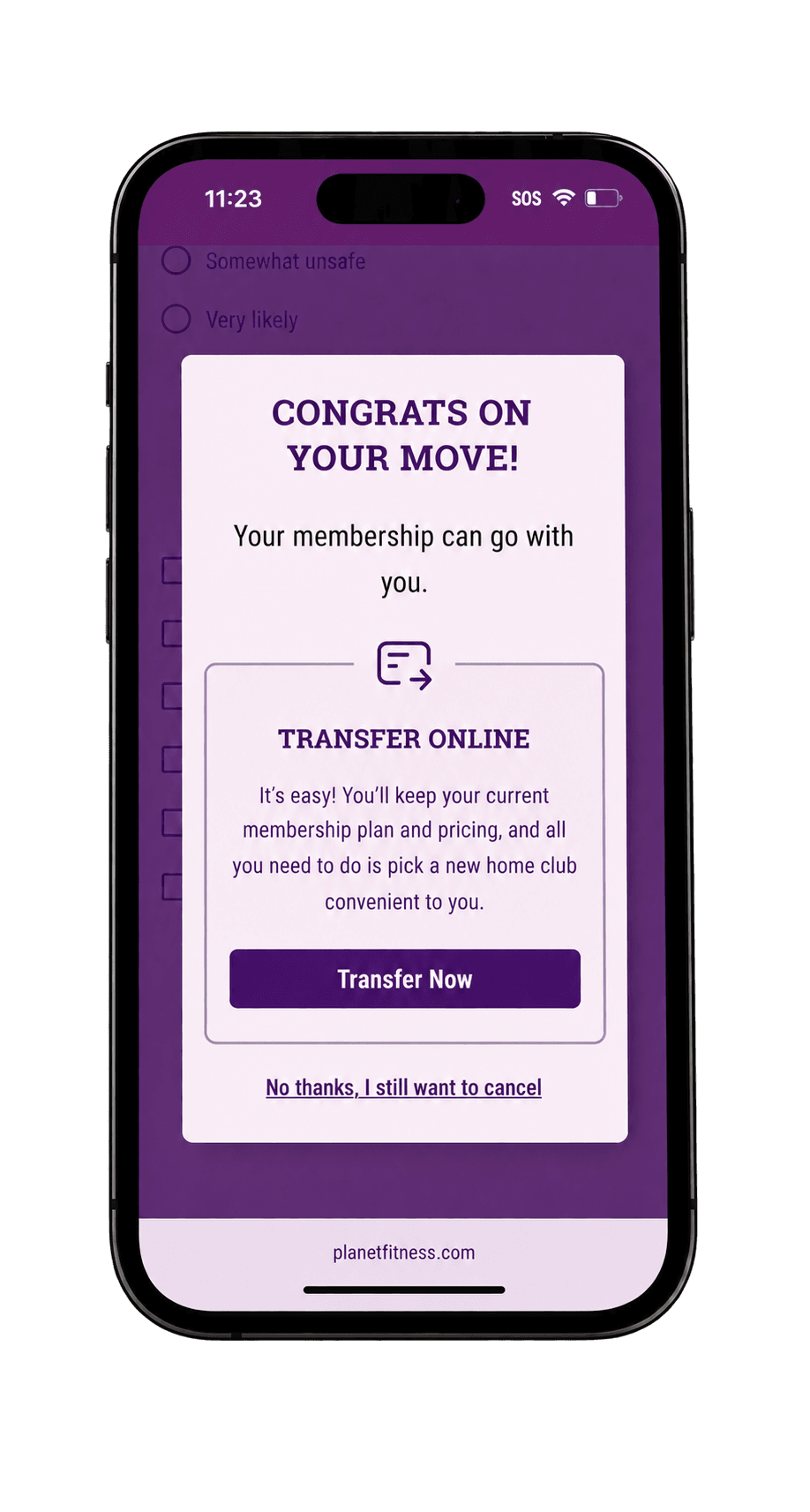
If this offer appears and you still want to cancel, tap No thanks, I still want to cancel.
-
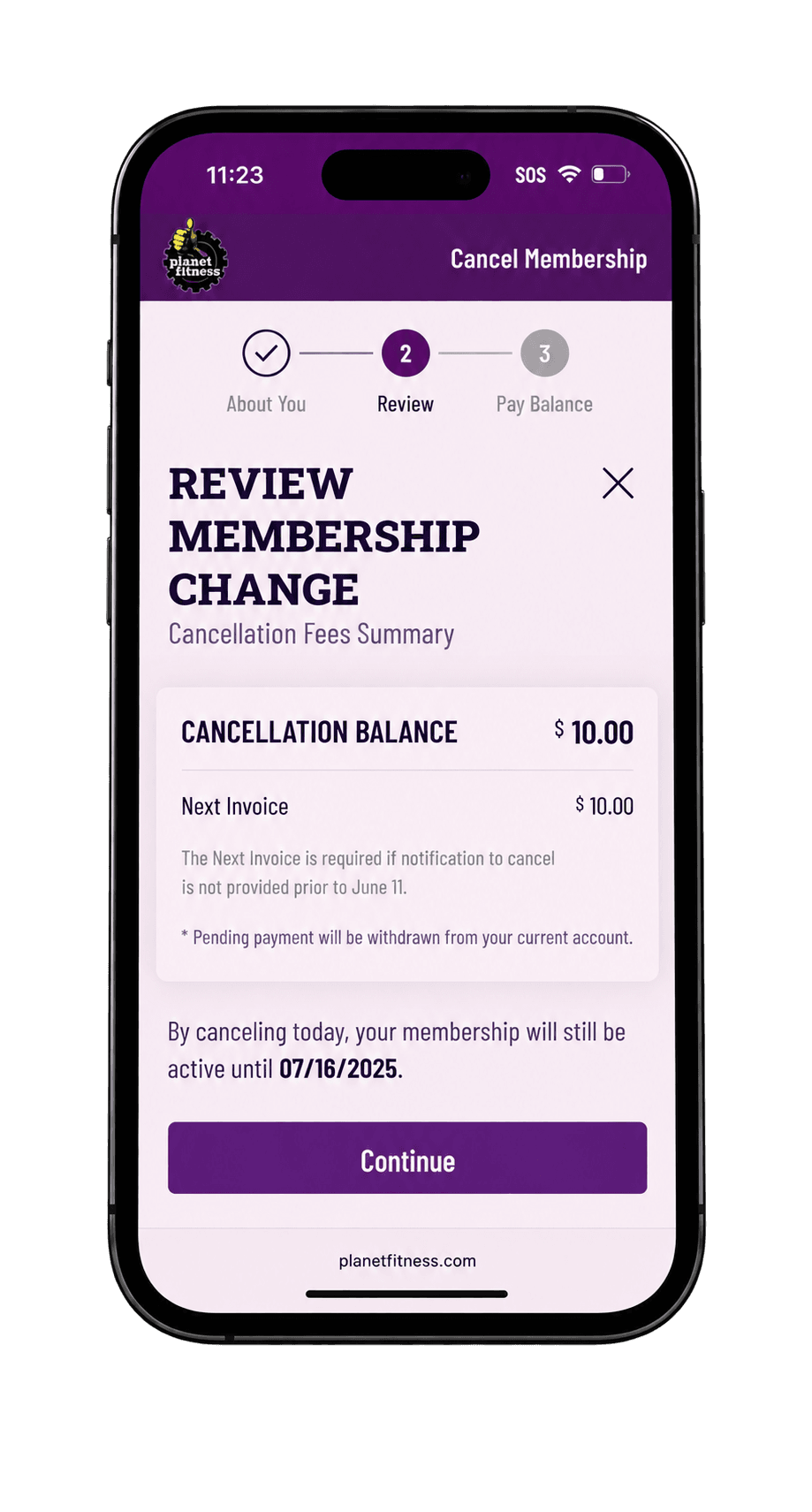
Check any amount you still owe and the date your membership will stay active until. Tap Continue.
-
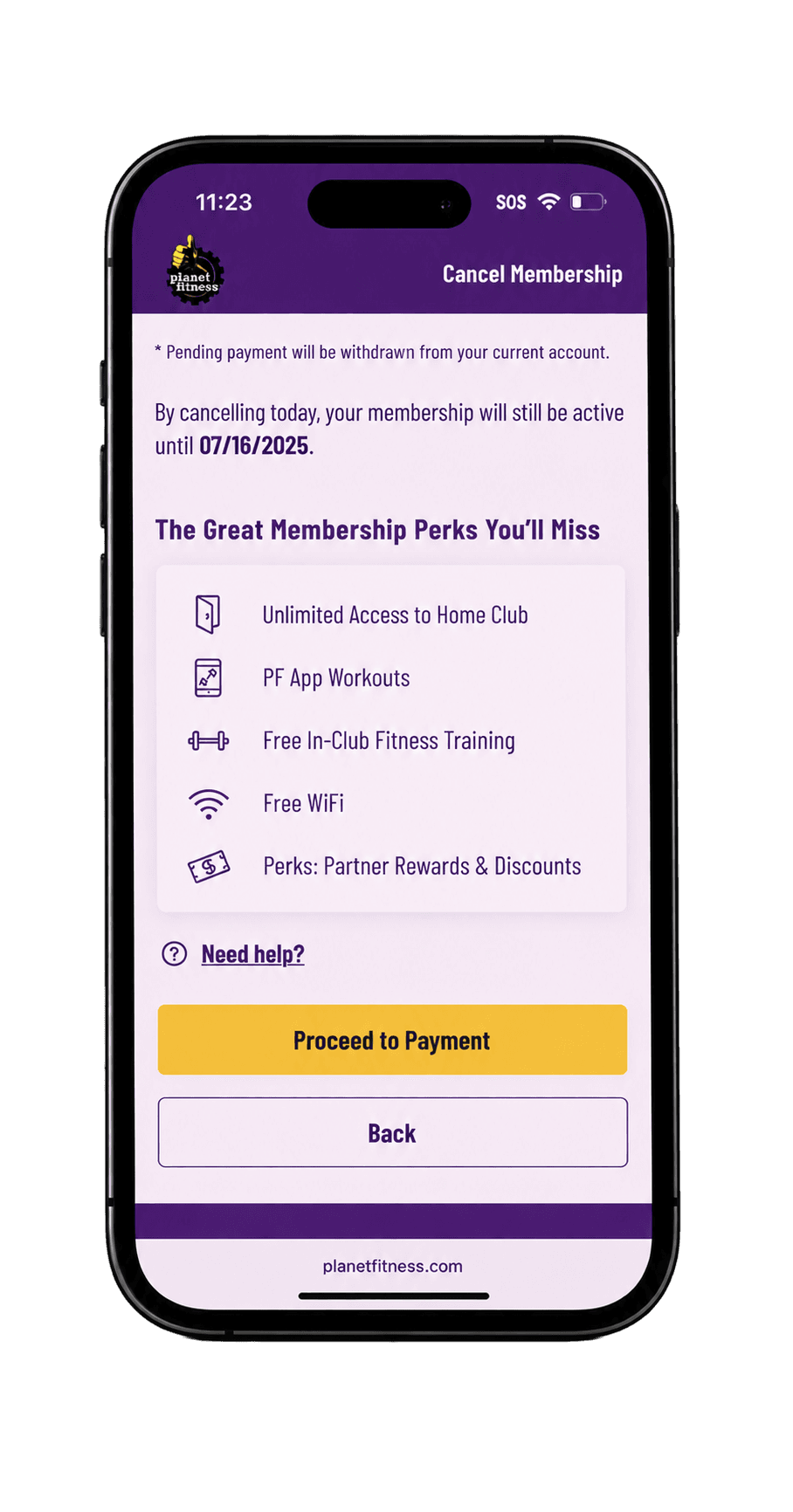
Scroll down and tap Proceed to Payment. Read the warning about any pending payment that will still be taken from your account.
-
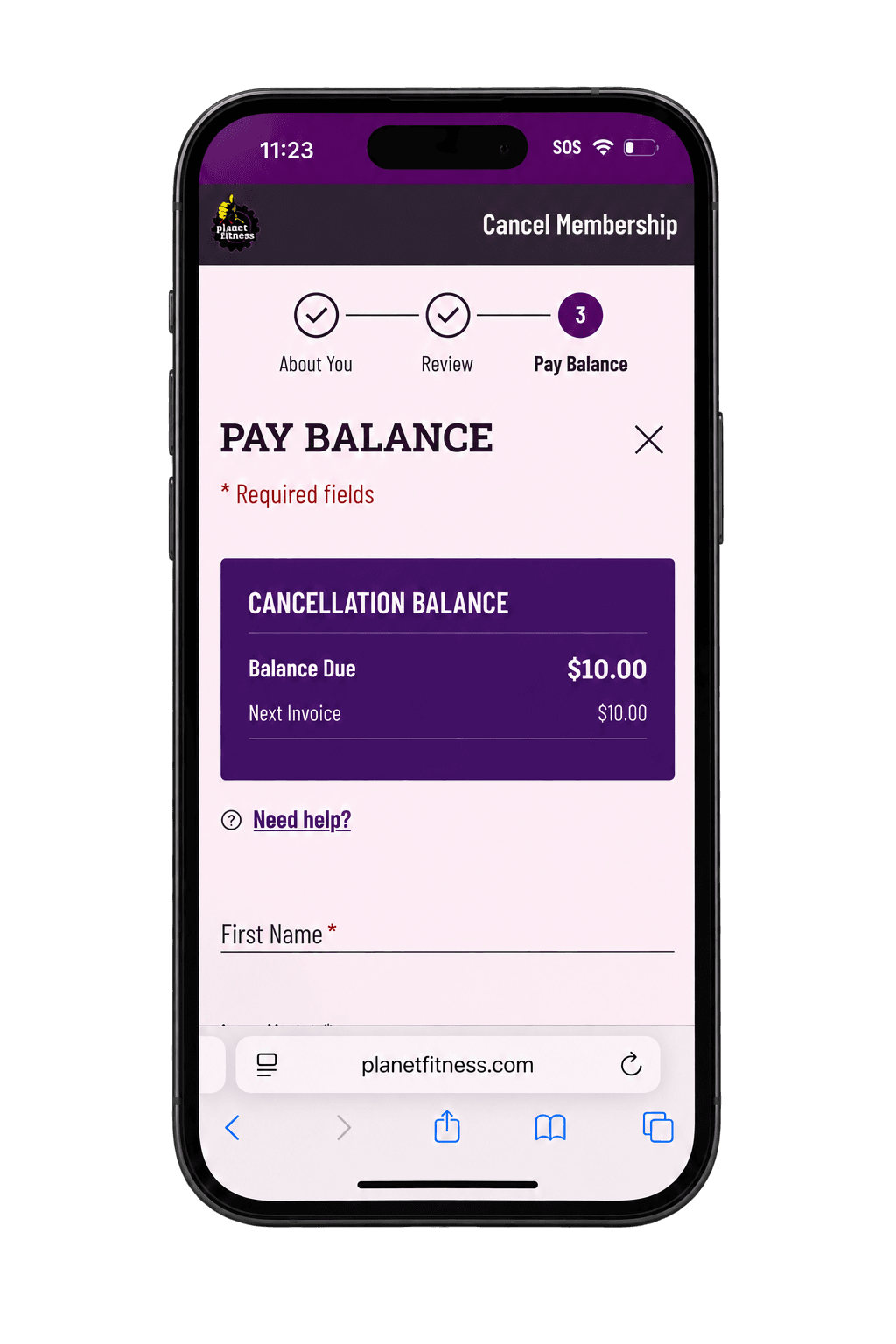
On Pay Balance, check Balance Due, then scroll down to fill in your payment details.
-
To pay now, enter the required name and card details, then tap Pay and Cancel Membership.
If you choose Cancel Now and Defer Payment, confirm with your home club when and how you must pay the remaining amount. Don’t assume this option removes what you owe.
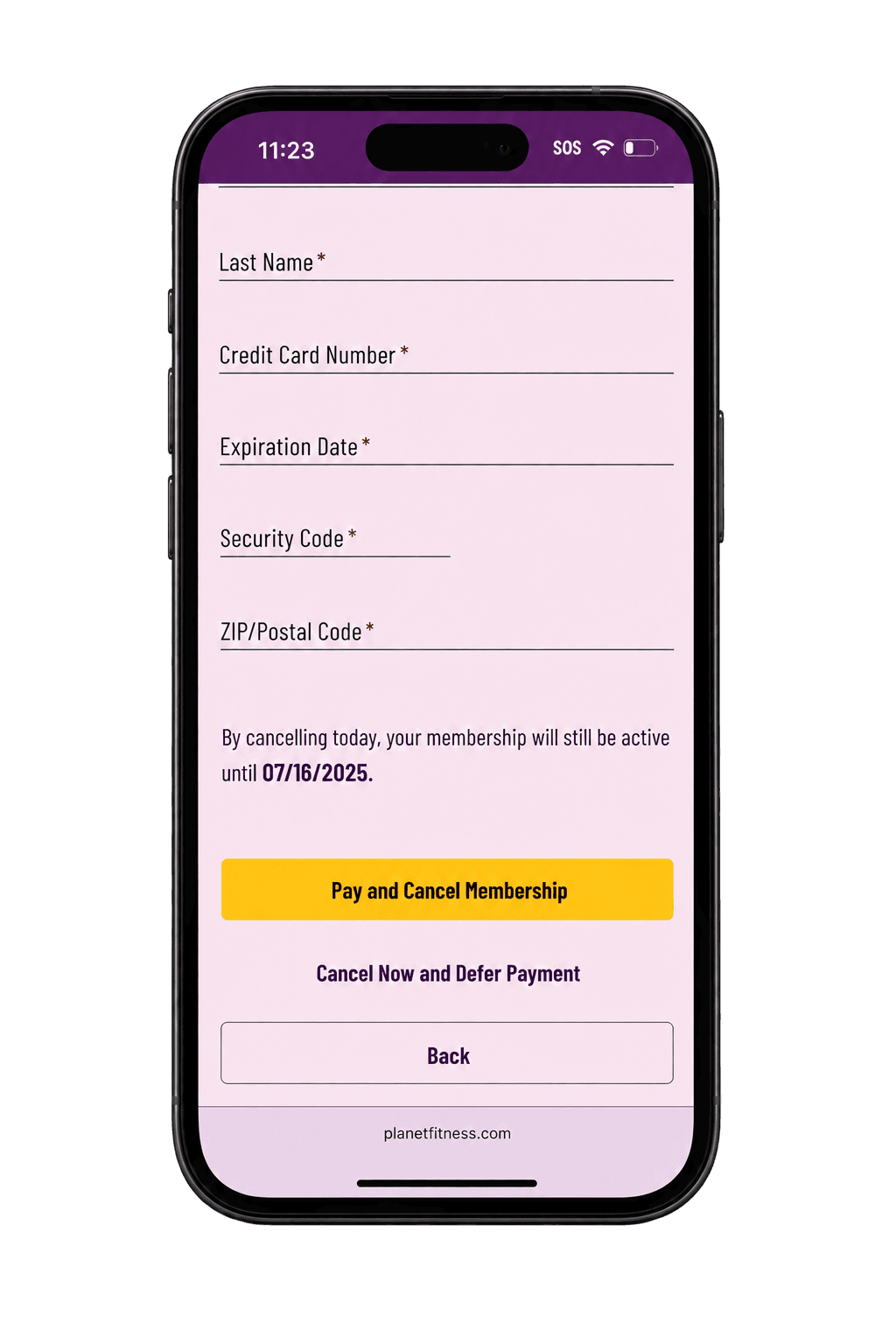
After submitting, save the confirmation and check your membership's end date. If you don't receive confirmation or the end date is unclear, ask your home club to confirm it.
If you can't find a cancellation option or see an error, go to What to do if cancellation won't go through. You can also cancel by mail or visit your home club.
How to cancel Planet Fitness by mail
You can cancel by sending a letter to your home club. Check your account to find your current club, then use the club finder to get its address.
If your membership agreement gives a different address for cancellation letters, send it there. Copy the full address so your letter reaches the right place.
Prepare your cancellation letter
A useful letter identifies your membership, clearly requests cancellation and asks for written confirmation. Include your name as it appears on the account, member or agreement number if known, contact details and the date. Check your agreement for any signature requirements.
Planet Fitness’s FAQ doesn’t list everything you must include in a cancellation letter or require a specific template. Check your agreement or ask your home club what it needs.
Step 1 of 2
Your membership information
Enter details exactly as they appear on your Planet Fitness account.
Review the completed letter and confirm the mailing address before sending. Sign it if your agreement requires it. Leave out bank account and payment-card numbers. You still need to send the letter to your home club; creating or downloading it does not submit cancellation.
Keep mailing and delivery records
Send your letter with tracking and keep a copy. USPS Certified Mail gives you proof that you mailed it and lets you check whether it was delivered. You can also add a Return Receipt to get the delivery date and the recipient’s signature. USPS extra services
Check your membership agreement for any mailing requirements. Planet Fitness’s FAQ does not say you must use Certified Mail.
Send it early enough to arrive before your cancellation deadline. Once it’s delivered, ask your home club to confirm that your membership is canceled and when it will end.
How to cancel at your home club
You can also cancel in person at your home club. Call before you go to ask when someone can help you cancel and what you need to bring.
At the front desk, you can say:
I'd like to cancel my membership. Please confirm the effective date and whether I have any remaining balance.
Follow the club's verification and cancellation process. Ask for a written record of the result and an explanation of any final charge. Save the record before leaving if one is provided.
Planet Fitness says to cancel at your home club. If another location is easier to get to, call first to ask if they can help you cancel
What to do if cancellation won't go through
Missing cancellation option or an account error
First, confirm you're signed into the account associated with the membership. If you cannot identify it, use any recovery options offered on the sign-in page or contact your home club for help.
If you can’t find the cancel option on your phone, try signing in on a computer. This may help, but it doesn’t guarantee the option will appear.
If you still can’t cancel online, contact your home club or cancel by mail or in person. Save a screenshot of the error, and make sure the club receives your cancellation request before the billing deadline.
“Cancel scheduled” or “cancel and defer payment” appears
A status label can leave the outcome unclear. We haven't verified Planet Fitness's exact definitions of these labels, so ask your club:
- Has my cancellation been accepted?
- What is the effective cancellation date?
- Is another membership payment scheduled?
- What balance, if any, remains due?
- Can you confirm these details in writing?
Keep the response with your cancellation records. Don't assume a postponed payment means you no longer owe the money. Canceling your membership and paying what you owe are separate steps. CFPB guidance on stopping payments and money you still owe
What to do if Planet Fitness keeps charging you
Check the charge against your cancellation records
Start by identifying what the charge covers: monthly payments, the annual fee, an early cancellation fee or another amount you owe. Compare it with:
- The request you sent or completed.
- When the club received your cancellation request.
- The club's acknowledgment and effective cancellation date.
- The charge date, amount and description.
Ask the club when it recorded your request and what the charge covers. If you dispute the charge, provide your cancellation records and ask for a correction. Use the billing deadlines above to check the timeline.
Ask your home club whether you can get a refund for unused days and when your gym access will end. Check your membership agreement too, because Planet Fitness’s FAQ doesn’t give a refund policy or access end date that applies to every membership.
Contact your bank or credit card company when needed
If Planet Fitness takes payments directly from your bank account, tell both Planet Fitness and your bank that you want those payments stopped. Ask your bank how to do this and whether there’s a fee. Keep copies of your messages and check for any further payments. CFPB: stopping automatic bank payments
If Planet Fitness keeps charging your card or you think a charge is wrong, contact your bank or credit card company. Ask how to dispute the charge and share your cancellation records. Keep copies of your messages and check your statements. FTC subscription cancellation guidance
Stopping payments does not cancel your membership or remove money you still owe. Ask your home club to confirm when your membership ends and whether you have anything left to pay.
If you still can’t resolve the problem, you can report it to the FTC or your state attorney general. Reporting it does not automatically cancel your membership or get you a refund.
Frequently asked questions
Can I cancel my Planet Fitness membership online?
Yes. Planet Fitness lists cancellation through its website’s member portal. Procedures may vary by location. Follow the online cancellation steps above. Planet Fitness FAQ
Can I cancel without visiting my home club?
Yes. You can use the website or send a cancellation letter to your home club. See how to cancel by mail if online cancellation doesn’t work. Planet Fitness FAQ
Can I cancel Planet Fitness by phone or email?
Planet Fitness’s FAQ doesn’t list phone or email as nationwide cancellation options. However, New York law requires gyms to accept both. Check your agreement and state rules, and ask your home club who to contact. Keep written confirmation of your cancellation. Planet Fitness FAQ, New York cancellation law
How much does it cost to cancel Planet Fitness?
Planet Fitness lists a $58 buyout fee if you cancel before your minimum term ends. Monthly payments, the annual fee or an unpaid balance may also be due. See billing deadlines and fees. Planet Fitness FAQ
Can I avoid the early cancellation fee?
No Commitment memberships have no cancellation fee. Otherwise, check when your commitment ends and whether your agreement or state law allows an exception. There isn’t a guaranteed workaround, and avoiding a cancellation fee doesn’t remove other payments you owe. Planet Fitness membership terms
Does Planet Fitness require a 12-month commitment?
Some memberships include a 12-month commitment; others don’t. Check your agreement rather than relying on the Classic or PF Black Card name. See how to check your minimum term. Planet Fitness membership terms
Can I cancel Planet Fitness after one month?
You can request cancellation, but the cost depends on your agreement. A No Commitment membership has no cancellation fee. Ending a minimum-term membership early may involve a buyout fee, and billing deadlines still apply. Planet Fitness membership terms, Planet Fitness FAQ
Why can’t I find the cancellation option online?
Planet Fitness doesn’t explain every missing-button case. Check that you’re signed into the account connected to your membership. If the option still isn’t there, contact your home club or cancel by mail or in person. See what to do when online cancellation fails. Planet Fitness FAQ
Can I ask my bank to stop Planet Fitness payments?
Yes, for automatic bank payments. Tell Planet Fitness and your bank that you’re withdrawing permission. Your bank may charge for a stop-payment order. This does not cancel your membership or remove money you owe. See how to contact your bank. CFPB guidance
Can I get my annual fee refunded if I cancel?
Don’t assume cancellation refunds the annual fee. Planet Fitness’s FAQ doesn’t give a refund policy that applies to every membership. Ask your home club whether you qualify for a refund and check your agreement. Planet Fitness FAQ
Does canceling Planet Fitness remove any unpaid balance?
Canceling does not automatically erase valid charges you already owe. Ask your home club how much remains due and what each charge covers. If a charge looks wrong, compare it with your cancellation records. CFPB guidance on payments and contracts
Do I need a reason to cancel?
Planet Fitness’s FAQ doesn’t say you need a specific reason to cancel. If asked, explain why you’re leaving, such as “I don’t use the gym anymore.” If you’re asking for a special exception to avoid a fee, your agreement or state law may require proof. Planet Fitness FAQ, New York cancellation law
Can Planet Fitness refuse my cancellation request?
A refusal may break your state’s law, depending on what happened. For example, New York requires gyms to accept several cancellation methods, including phone and email. You may still owe an early cancellation fee or other payments even if you have the right to cancel. New York cancellation law
Can I sue Planet Fitness for not letting me cancel?
Possibly, depending on your state’s law and why the gym refused your request. In New York, the Attorney General says you can sue in small claims court if you believe a gym broke the state’s health-club law. Winning isn’t guaranteed. New York Attorney General: gym membership rights
Confirm the effective date before you close the issue
If the outcome is still unclear, send your home club the request and any delivery or confirmation records. Ask for the effective cancellation date and an explanation of any remaining balance in writing.
Once you have confirmation, retain it and check your next relevant statement for unexpected charges. FTC cancellation recordkeeping guidance